
Your account
My Info — make Dr. Jared’s AI more accurate
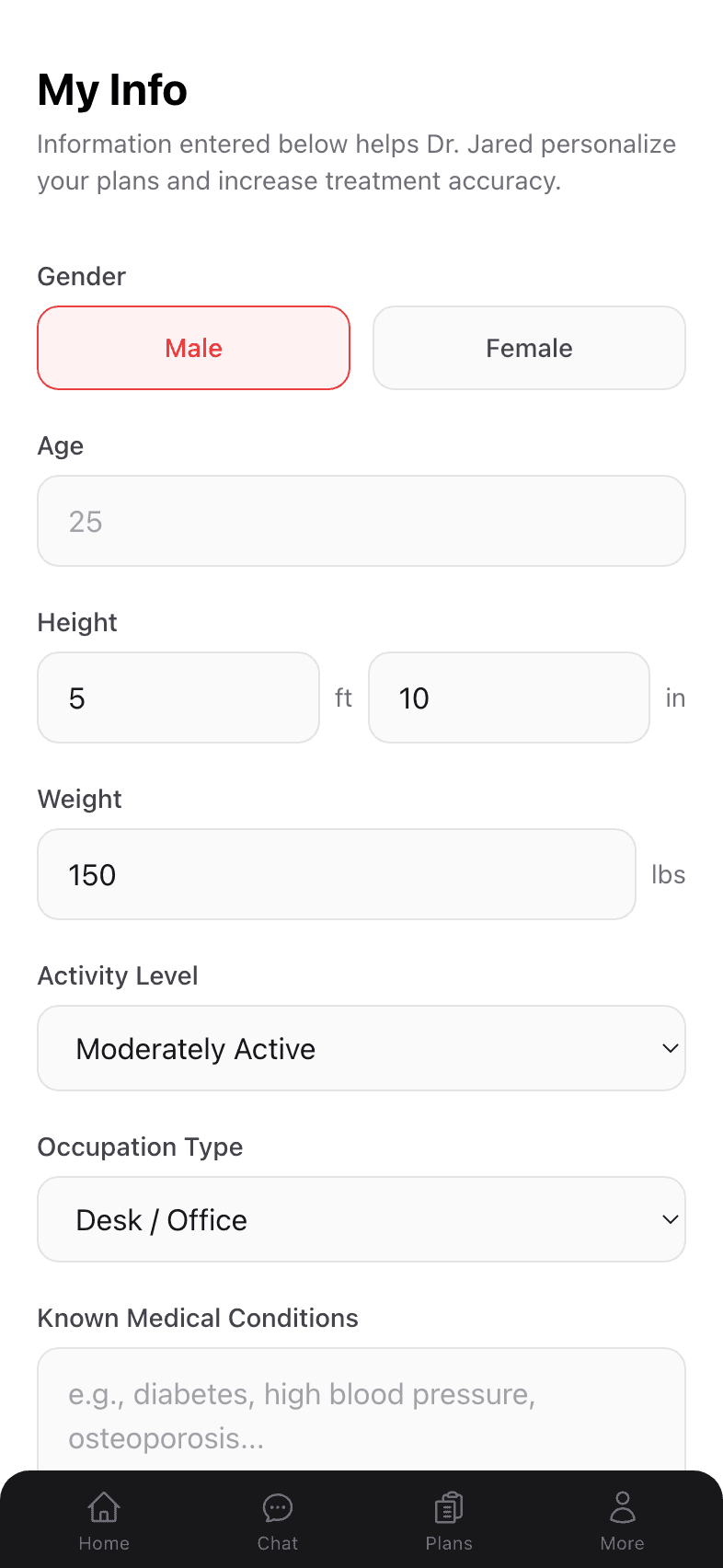
The single highest-leverage thing you can do for better plans. Filling out My Info takes about 90 seconds and meaningfully sharpens Dr. Jared’s recommendations.
Why this page matters
Dr. Jared can build a plan from a chat alone — but the plan gets dramatically more tailored when he knows your age, height and weight, activity level, day-job posture, and any known medical conditions. A 28-year-old runner and a 65-year-old post-knee-replacement patient need different exercises, even with the same complaint.
How to open My Info
- 1
Tap the More tab
The silhouette icon on the far right of the bottom navigation. - 2
Tap My Info
It’s the first menu item below your profile row, with a clipboard icon.
What each field does
Gender
Drives the avatar style on plan cards and body-area illustrations, plus subtle defaults around things like pelvic-floor and pre/post-natal considerations.
Age
A big driver of recovery time, exercise selection, and load tolerance. Especially important if you’re over 60. It’s filled in from the date of birth you gave at signup.
Height & Weight
Used together for general load awareness. Dr. Jared won’t prescribe heavy weighted movements without knowing roughly what your body can handle.
Activity Level
Sedentary, lightly active, moderately active, very active. This shapes the intensity and progression of every plan.
Occupation Type
Desk/Office, Manual labor, On feet, Mixed, or Other. Desk workers get more counter- posture work; manual laborers get more recovery-focused mobility.
Known Medical Conditions
A free-text field — type in anything Dr. Jared should know about: hypertension, osteoporosis, pregnancy, etc. The more relevant detail, the better.
Past Surgical History
Add each prior surgery as its own entry — a short description (“total knee replacement,” “ACL reconstruction,” “C-section”) plus the approximate month and year. The date is the important part: a past surgery can change which exercises are safe, and a recent one tells Dr. Jared to defer to your surgeon’s protocol before building a plan. Use Add surgery for more entries, or the × to remove one.
Saving your info
Make changes and tap the big red Save button at the bottom. The change applies immediately — your next chat with Dr. Jared will use the updated info.
Existing plans aren’t retroactively re-generated when you update My Info. If you want a fresh plan with the new information, just say so in chat: “I updated my info — can you rebuild my plan?”
Privacy
The information in My Info is private to your account and is never sold. It is used to personalize what Dr. Jared recommends: with your permission, it is shared with our AI provider, Anthropic (Claude), when Dr. Jared answers you or builds a plan. We treat it the way you’d expect a clinic to treat your intake form. See our Privacy Policy for details.